
Toyota CH-R Service Manual: Removal
REMOVAL
CAUTION / NOTICE / HINT
The necessary procedures (adjustment, calibration, initialization, or registration) that must be performed after parts are removed and installed, or replaced the during antenna cord sub-assembly removal/installation are shown below.
Necessary Procedures After Parts Removed/Installed/Replaced|
Replaced Part or Performed Procedure |
Necessary Procedure |
Effect/Inoperative Function when Necessary Procedure not Performed |
Link |
|---|---|---|---|
|
Disconnect cable from negative battery terminal |
Initialize back door lock |
Power door lock control system |
|
|
Memorize steering angle neutral point |
Lane departure alert system (w/ Steering Control) |
|
|
|
Pre-collision system |
CAUTION:
Some of these service operations affect the SRS airbag system. Read the precautionary notices concerning the SRS airbag system before servicing.
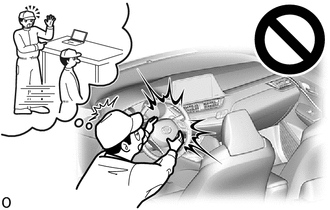
Click here
.gif)
PROCEDURE
1. REMOVE INSTRUMENT PANEL SAFETY PAD
Click here
2. REMOVE NO. 3 HEATER TO REGISTER DUCT SUB-ASSEMBLY
Click here
3. REMOVE ANTENNA CORD SUB-ASSEMBLY
(a) Disengage the clamps to remove the antenna cord sub-assembly.
.png)
|
*A |
w/ USB Audio System |
*B |
w/ Manual (SOS) Switch |
(b) w/ Manual (SOS) Switch:
(1) Disconnect the connector.
4. REMOVE ROOF HEADLINING
Click here
5. REMOVE NO. 2 ANTENNA CORD SUB-ASSEMBLY
(a) Type A:
(1) Remove each adhesive tape from the roof headlining.
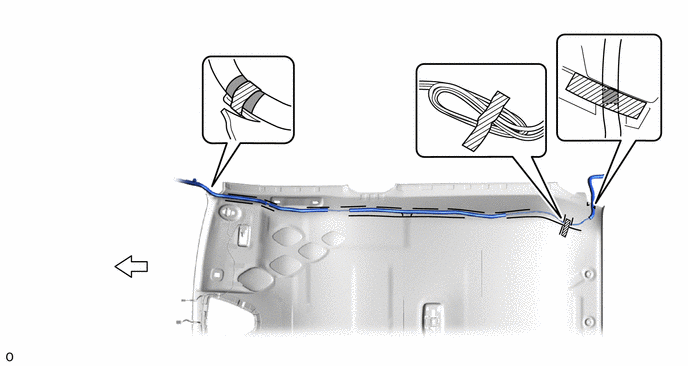
 |
Adhesive Tape |
.png) |
Front |
(2) Remove the No. 2 antenna cord sub-assembly from the roof headlining.
(b) Type B:
(1) Remove each adhesive tape from the roof headlining.
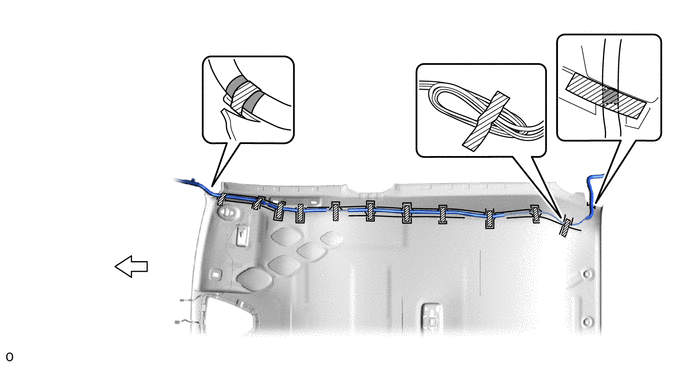
|
|
Adhesive Tape |
|
Front |
(2) Remove the No. 2 antenna cord sub-assembly from the roof headlining.
6. REMOVE NO. 3 ANTENNA CORD SUB-ASSEMBLY
|
(a) Disconnect the connector. |
|
.png)
(b) Disengage the clamps.
(c) w/o Manual (SOS) Switch
|
(1) Remove the bolt. |
|
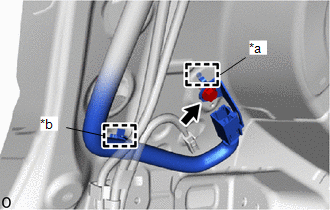
(2) Disengage the clamp and guide to remove the No. 3 antenna cord sub-assembly.
(d) w/ Manual (SOS) Switch
|
(1) Disconnect the connector of the floor wire. |
|
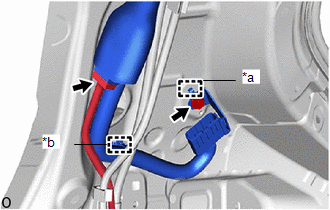
(2) Remove the bolt.
(3) Disengage the clamp and guide to remove the No. 3 antenna cord sub-assembly.
 Installation
INSTALLATION
PROCEDURE
1. INSTALL NO. 3 ANTENNA CORD SUB-ASSEMBLY
(a) w/o Manual (SOS) Switch
(1) Engage the clamp and guide to temporarily install the No. 3 antenna
cord sub-assemb ...
 Radio Receiver(for Radio Receiver Type)
Components
COMPONENTS
ILLUSTRATION
*1
INSTRUMENT CLUSTER FINISH CENTER PANEL SUB-ASSEMBLY
*2
RADIO RECEIVER ASSEMBLY WITH BRACKET
ILLUSTRAT ...
Other materials:
Toyota CH-R Service Manual > Smart Key System(for Entry Function): Driver Side Door Entry Lock Function does not Operate
DESCRIPTION
If the entry lock function does not operate for the driver door only, but the
entry unlock function operates, the request code is being transmitted properly from
the driver door. In this case, there may be a problem related to the lock sensor
(connection between the certification ...
Toyota CH-R Service Manual > Meter / Gauge System: Customize Parameters
CUSTOMIZE PARAMETERS
CUSTOMIZE METER / GAUGE SYSTEM
(a) Customizing with the Techstream.
(1) Connect the Techstream to the DLC3.
(2) Turn the ignition switch ON.
(3) Turn the Techstream on.
(4) Enter the following menus: Customize Setting / Warning or Display.
(5) Select the setting by referr ...
Toyota C-HR (AX20) 2023-2026 Owner's Manual
Toyota CH-R Owners Manual
- For safety and security
- Instrument cluster
- Operation of each component
- Driving
- Interior features
- Maintenance and care
- When trouble arises
- Vehicle specifications
- For owners
Toyota CH-R Service Manual
- Introduction
- Maintenance
- Audio / Video
- Cellular Communication
- Navigation / Multi Info Display
- Park Assist / Monitoring
- Brake (front)
- Brake (rear)
- Brake Control / Dynamic Control Systems
- Brake System (other)
- Parking Brake
- Axle And Differential
- Drive Shaft / Propeller Shaft
- K114 Cvt
- 3zr-fae Battery / Charging
- Networking
- Power Distribution
- Power Assist Systems
- Steering Column
- Steering Gear / Linkage
- Alignment / Handling Diagnosis
- Front Suspension
- Rear Suspension
- Tire / Wheel
- Tire Pressure Monitoring
- Door / Hatch
- Exterior Panels / Trim
- Horn
- Lighting (ext)
- Mirror (ext)
- Window / Glass
- Wiper / Washer
- Door Lock
- Heating / Air Conditioning
- Interior Panels / Trim
- Lighting (int)
- Meter / Gauge / Display
- Mirror (int)
- Power Outlets (int)
- Pre-collision
- Seat
- Seat Belt
- Supplemental Restraint Systems
- Theft Deterrent / Keyless Entry

0.0096