
Toyota CH-R Service Manual: Front Passenger Side Seat Belt Warning Light Malfunction
DESCRIPTION
When the ignition switch is turned ON, the occupant detection ECU sends signals to the airbag sensor assembly to indicate the state of the front seat inner belt assembly RH and also whether the front passenger seat is occupied. The airbag sensor assembly sends those signals to the combination meter assembly via CAN communication. The seat belt warning light on the combination meter assembly illuminates, blinks or turns off in accordance with these signals.
WIRING DIAGRAM
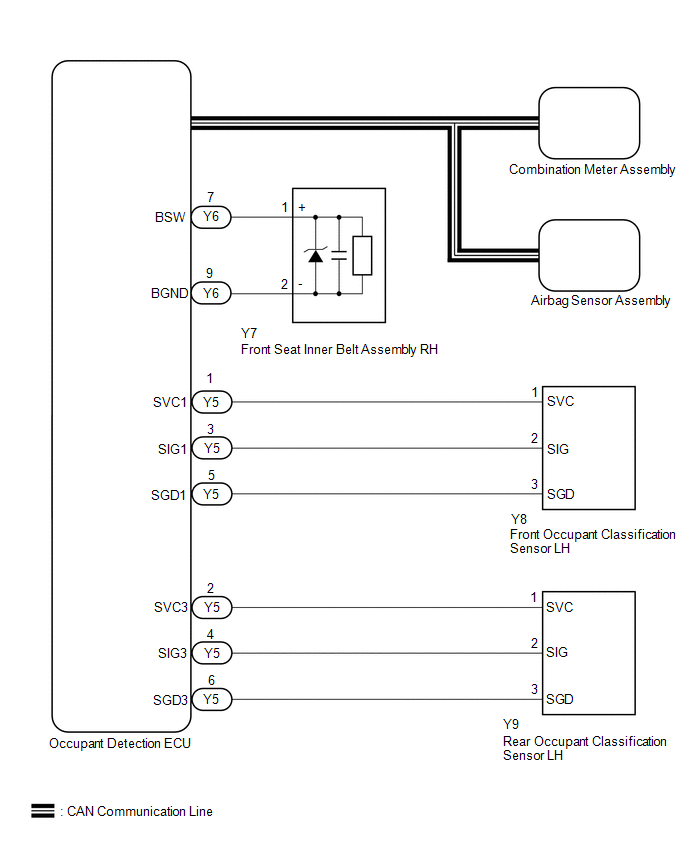
CAUTION / NOTICE / HINT
NOTICE:
- The seat belt warning system uses the CAN communication system. First,
confirm that there are no malfunctions in the CAN communication system.
Refer to How to Proceed with Troubleshooting.
Click here
.gif)
- When replacing the combination meter assembly, always replace it with a new one. If a combination meter assembly which was installed to another vehicle is used, the information stored in it will not match the information from the vehicle and a DTC may be stored.
HINT:
The seat belt warning light on the combination meter assembly is used for both the driver seat and front passenger seat. Check that the operation of the seat belt warning light is normal first.
Click here
If the seat belt warning light does not operate for both the driver seat and front passenger seat, replace the combination meter assembly.
Click here
PROCEDURE
|
1. |
CHECK DTC OUTPUT (OCCUPANT CLASSIFICATION SYSTEM) |
(a) Clear the DTCs.
Click here
(b) Check for DTCs.
Click here
|
Result |
Proceed to |
|---|---|
|
DTCs are not output |
A |
|
DTCs are output |
B |
| B | .gif) |
GO TO OCCUPANT CLASSIFICATION SYSTEM |
|
.gif)
|
2. |
CHECK DTC OUTPUT (AIRBAG SYSTEM) |
(a) Clear the DTCs.
Click here
(b) Check for DTCs.
Click here
|
Result |
Proceed to |
|---|---|
|
DTCs are not output |
A |
|
DTCs are output |
B |
| B | |
GO TO AIRBAG SYSTEM |
|
|
3. |
READ VALUE USING TECHSTREAM |
(a) Connect the Techstream to the DLC3.
(b) Turn the ignition switch to ON.
(c) Turn the Techstream on.
(d) Enter the following menus: Body Electrical / Occupant Detection / Data List.
(e) Read the Data List according to the display on the Techstream.
Body Electrical > Occupant Detection > Data List|
Tester Display |
Measurement Item |
Range |
Normal Condition |
Diagnostic Note |
|---|---|---|---|---|
|
Passenger Buckle SW |
Front passenger buckle switch |
Unset, Set or NG |
Unset: Seat belt not fastened Set: Seat belt fastened NG: Data is not determined |
- |
|
Tester Display |
|---|
|
Passenger Buckle SW |
|
Result |
Proceed to |
|---|---|
|
Unset or Set is displayed on the Techstream according to the front passenger seat belt condition |
A |
|
Unset or Set is not displayed correctly on the Techstream according to the front passenger seat belt condition |
B |
|
NG is displayed on the Techstream |
C |
| B | |
REPLACE FRONT SEAT INNER BELT ASSEMBLY RH
|
| C | |
REPLACE OCCUPANT DETECTION ECU |
|
|
4. |
READ VALUE USING TECHSTREAM |
(a) Connect the Techstream to the DLC3.
(b) Turn the ignition switch to ON.
(c) Turn the Techstream on.
(d) Enter the following menus: Body Electrical / SRS Airbag / Data List.
(e) Read the Data List according to the display on the Techstream.
Body Electrical > SRS Airbag > Data List|
Tester Display |
Measurement Item |
Range |
Normal Condition |
Diagnostic Note |
|---|---|---|---|---|
|
Right side Buckle SW |
RH buckle switch |
Unset, Set or NG |
Unset: Seat belt not fastened Set: Seat belt fastened NG: Data is not determined |
- |
|
Tester Display |
|---|
|
Right side Buckle SW |
|
Result |
Proceed to |
|---|---|
|
Unset or Set is displayed on the Techstream according to the front passenger seat belt condition |
A |
|
B |
| A | |
USE SIMULATION METHOD TO CHECK |
| B | |
REPLACE AIR BAG SENSOR ASSEMBLY |
 Driver Side Seat Belt Warning Light does not Operate
DESCRIPTION
The seat belt warning light on the combination meter assembly illuminates, blinks
or turns off in accordance with the state of the front seat inner belt assembly
LH.
WIRING DIAGRAM
...
 Rear Seat Belt Warning Light Malfunction
DESCRIPTION
The main body ECU (multiplex network body ECU) detects whether either the rear
doors are open or closed based on the condition of the rear door courtesy light
switch assemblies condit ...
Other materials:
Toyota CH-R Service Manual > Rear Spoiler: Removal
REMOVAL
PROCEDURE
1. REMOVE BACK DOOR TRIM UPPER PANEL ASSEMBLY
Click here
2. REMOVE NO. 2 BACK DOOR PANEL PROTECTOR
Click here
3. REMOVE NO. 1 BACK DOOR PANEL PROTECTOR
HINT:
Use the same procedure as for the No. 2 back door panel protector side.
4. REMOVE REAR SPOILER ASSEMBLY ...
Toyota CH-R Service Manual > Navigation System: Sending Malfunction (Navigation to APGS) (U0073,U0100,U0129,U0140,U0155,U0164,U0198)
DESCRIPTION
These DTCs are stored when a malfunction occurs in the CAN communication circuit.
DTC No.
Detection Item
DTC Detection Condition
Trouble Area
U0073
Sending Malfunction (Navigation to APGS)
CAN bus connec ...
Toyota C-HR (AX20) 2023-2026 Owner's Manual
Toyota CH-R Owners Manual
- For safety and security
- Instrument cluster
- Operation of each component
- Driving
- Interior features
- Maintenance and care
- When trouble arises
- Vehicle specifications
- For owners
Toyota CH-R Service Manual
- Introduction
- Maintenance
- Audio / Video
- Cellular Communication
- Navigation / Multi Info Display
- Park Assist / Monitoring
- Brake (front)
- Brake (rear)
- Brake Control / Dynamic Control Systems
- Brake System (other)
- Parking Brake
- Axle And Differential
- Drive Shaft / Propeller Shaft
- K114 Cvt
- 3zr-fae Battery / Charging
- Networking
- Power Distribution
- Power Assist Systems
- Steering Column
- Steering Gear / Linkage
- Alignment / Handling Diagnosis
- Front Suspension
- Rear Suspension
- Tire / Wheel
- Tire Pressure Monitoring
- Door / Hatch
- Exterior Panels / Trim
- Horn
- Lighting (ext)
- Mirror (ext)
- Window / Glass
- Wiper / Washer
- Door Lock
- Heating / Air Conditioning
- Interior Panels / Trim
- Lighting (int)
- Meter / Gauge / Display
- Mirror (int)
- Power Outlets (int)
- Pre-collision
- Seat
- Seat Belt
- Supplemental Restraint Systems
- Theft Deterrent / Keyless Entry

0.0099