
Toyota CH-R Service Manual: Driver Side Seat Belt Warning Light does not Operate
DESCRIPTION
The seat belt warning light on the combination meter assembly illuminates, blinks or turns off in accordance with the state of the front seat inner belt assembly LH.
WIRING DIAGRAM
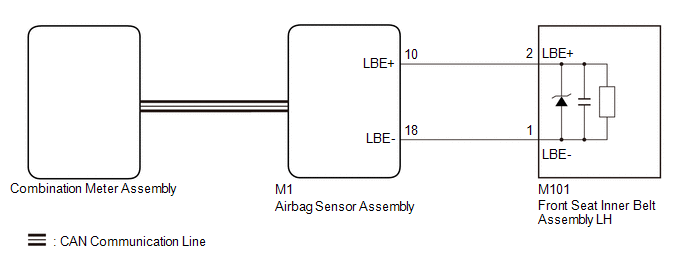
CAUTION / NOTICE / HINT
NOTICE:
- The seat belt warning system uses the CAN communication system. First,
confirm that there are no malfunctions in the CAN communication system.
Refer to How to Proceed with Troubleshooting.
Click here
.gif)
- When replacing the combination meter assembly, always replace it with a new one. If a combination meter assembly which was installed to another vehicle is used, the information stored in it will not match the information from the vehicle and a DTC may be stored.
HINT:
The seat belt warning light on the combination meter assembly is used for both the driver seat and front passenger seat. Check that the operation of the seat belt warning light is normal first.
Click here
If the seat belt warning light does not operate for both the driver seat and front passenger seat, replace the combination meter assembly.
Click here
PROCEDURE
|
1. |
CHECK DTC OUTPUT (AIRBAG SYSTEM) |
(a) Clear the DTCs.
Click here
(b) Check for DTCs.
Click here
|
Result |
Proceed to |
|---|---|
|
DTCs are not output |
A |
|
DTCs are output |
B |
| B | .gif) |
GO TO AIRBAG SYSTEM |
|
.gif)
|
2. |
READ VALUE USING TECHSTREAM |
(a) Connect the Techstream to the DLC3.
(b) Turn the ignition switch to ON.
(c) Turn the Techstream on.
(d) Enter the following menus: Body Electrical / SRS Airbag / Data List.
(e) Read the Data List according to the display on the Techstream.
Body Electrical > SRS Airbag > Data List|
Tester Display |
Measurement Item |
Range |
Normal Condition |
Diagnostic Note |
|---|---|---|---|---|
|
Left side Buckle SW |
LH buckle switch |
Unset, Set or NG |
Unset: Seat belt not fastened Set: Seat belt fastened NG: Data is not determined |
- |
|
Tester Display |
|---|
|
Left side Buckle SW |
|
Result |
Proceed to |
|---|---|
|
Unset or Set is displayed on the Techstream according to the driver seat belt condition |
A |
|
Unset or Set is not displayed correctly on the Techstream according to the driver seat belt condition |
B |
|
NG is displayed on the Techstream |
C |
| A | |
USE SIMULATION METHOD TO CHECK |
| B | |
REPLACE FRONT SEAT INNER BELT ASSEMBLY LH
|
| C | |
REPLACE AIR BAG SENSOR ASSEMBLY |
 On-vehicle Inspection
ON-VEHICLE INSPECTION
PROCEDURE
1. INSPECT DRIVER SEAT BELT WARNING LIGHT
HINT:
The seat belt warning light on the combination meter assembly is used for both
the driver seat and front passenger ...
 Front Passenger Side Seat Belt Warning Light Malfunction
DESCRIPTION
When the ignition switch is turned ON, the occupant detection ECU sends signals
to the airbag sensor assembly to indicate the state of the front seat inner belt
assembly RH and also w ...
Other materials:
Toyota CH-R Service Manual > Immobiliser System(w/ Smart Key System): Short to GND in Immobiliser System Power Source Circuit (B278A)
DESCRIPTION
When there is a short to GND in the power supply for the transponder key amplifier
of the engine switch, the certification ECU (smart key ECU assembly) stores this
DTC.
DTC No.
Detection Item
DTC Detection Condition
Trouble Area
...
Toyota CH-R Service Manual > Automatic Headlight Beam Level Control System: Precaution
PRECAUTION
IGNITION SWITCH EXPRESSIONS
(a) The type of ignition switch used on this model differs depending on the specifications
of the vehicle. The expressions listed in the table below are used in this section.
Expression
Ignition Switch (Position)
Engine Swi ...
Toyota C-HR (AX20) 2023-2026 Owner's Manual
Toyota CH-R Owners Manual
- For safety and security
- Instrument cluster
- Operation of each component
- Driving
- Interior features
- Maintenance and care
- When trouble arises
- Vehicle specifications
- For owners
Toyota CH-R Service Manual
- Introduction
- Maintenance
- Audio / Video
- Cellular Communication
- Navigation / Multi Info Display
- Park Assist / Monitoring
- Brake (front)
- Brake (rear)
- Brake Control / Dynamic Control Systems
- Brake System (other)
- Parking Brake
- Axle And Differential
- Drive Shaft / Propeller Shaft
- K114 Cvt
- 3zr-fae Battery / Charging
- Networking
- Power Distribution
- Power Assist Systems
- Steering Column
- Steering Gear / Linkage
- Alignment / Handling Diagnosis
- Front Suspension
- Rear Suspension
- Tire / Wheel
- Tire Pressure Monitoring
- Door / Hatch
- Exterior Panels / Trim
- Horn
- Lighting (ext)
- Mirror (ext)
- Window / Glass
- Wiper / Washer
- Door Lock
- Heating / Air Conditioning
- Interior Panels / Trim
- Lighting (int)
- Meter / Gauge / Display
- Mirror (int)
- Power Outlets (int)
- Pre-collision
- Seat
- Seat Belt
- Supplemental Restraint Systems
- Theft Deterrent / Keyless Entry

0.012