
Toyota CH-R Owners Manual: Hood
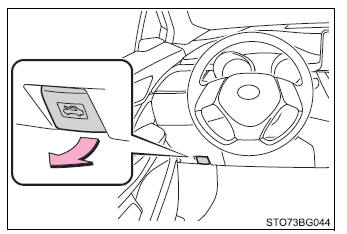
Release the lock from the inside of the vehicle to open the hood.
1. Pull the hood lock release lever.
The hood will pop up slightly.
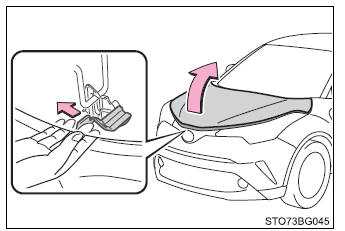
2. Move the auxiliary catch lever to side direction and lift the hood.
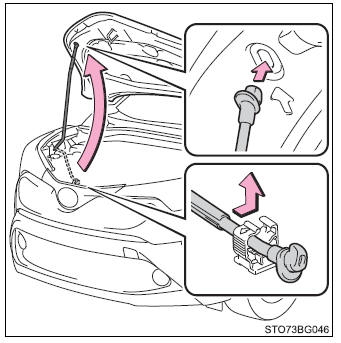
3. Hold the hood open by inserting the support rod into the slot.
■Pre-driving check Check that the hood is fully closed and locked.
If the hood is not locked properly, it may open while the vehicle is in motion and cause an accident, which may result in death or serious injury.
■After installing the support rod into the slot Make sure the rod supports the hood securely preventing it from falling down onto your head or body.
■When closing the hood Be sure to return the support rod to its clip before closing the hood. Closing the hood without returning the support rod properly could cause the hood to bend.
 Do-it-yourself service precautions
If you perform maintenance by yourself, be sure to follow the correct
procedure as given in these sections.
Items
Parts and tools
Battery condition
Warm water
Ba ...
 Positioning a floor jack
When using a floor jack, follow the instructions in the manual provided
with the jack and perform the operation safely.
When raising your vehicle with a floor jack, position the jack correctly.
...
Other materials:
Toyota CH-R Service Manual > Vacuum Pump: Installation
INSTALLATION
PROCEDURE
1. INSTALL VACUUM PUMP ASSEMBLY
(a) When installing a new vacuum pump assembly:
(1) Apply engine oil to the No. 2 O-ring and No. 3 O-ring which are installed
to a new vacuum pump assembly.
...
Toyota CH-R Service Manual > Continuously Variable Transaxle System: Lost Communication with Lateral Acceleration Sensor Module (U0124)
DESCRIPTION
The ECM receives signals sent from the airbag sensor assembly (yaw rate and acceleration
sensor) via CAN communication. When DTCs indicating a CAN communication system malfunction
are output, repair the CAN communication system before repairing each corresponding
ECU or sensor.
...
Toyota C-HR (AX20) 2023-2026 Owner's Manual
Toyota CH-R Owners Manual
- For safety and security
- Instrument cluster
- Operation of each component
- Driving
- Interior features
- Maintenance and care
- When trouble arises
- Vehicle specifications
- For owners
Toyota CH-R Service Manual
- Introduction
- Maintenance
- Audio / Video
- Cellular Communication
- Navigation / Multi Info Display
- Park Assist / Monitoring
- Brake (front)
- Brake (rear)
- Brake Control / Dynamic Control Systems
- Brake System (other)
- Parking Brake
- Axle And Differential
- Drive Shaft / Propeller Shaft
- K114 Cvt
- 3zr-fae Battery / Charging
- Networking
- Power Distribution
- Power Assist Systems
- Steering Column
- Steering Gear / Linkage
- Alignment / Handling Diagnosis
- Front Suspension
- Rear Suspension
- Tire / Wheel
- Tire Pressure Monitoring
- Door / Hatch
- Exterior Panels / Trim
- Horn
- Lighting (ext)
- Mirror (ext)
- Window / Glass
- Wiper / Washer
- Door Lock
- Heating / Air Conditioning
- Interior Panels / Trim
- Lighting (int)
- Meter / Gauge / Display
- Mirror (int)
- Power Outlets (int)
- Pre-collision
- Seat
- Seat Belt
- Supplemental Restraint Systems
- Theft Deterrent / Keyless Entry

0.0105