
Toyota CH-R Service Manual: Installation
INSTALLATION
CAUTION / NOTICE / HINT
NOTICE:
After replacing the rear disc brake pads, the brake pedal may feel soft due to clearance between the rear disc brake pads and rear disc. Depress the brake pedal several times until the brake pedal feels firm.
HINT:
- The following procedure is for the LH side.
- Use the same procedure for the RH side and LH side.
PROCEDURE
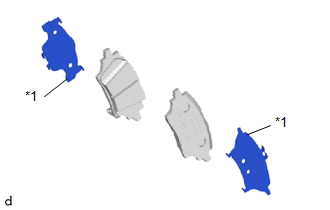
1. INSTALL REAR DISC BRAKE ANTI-SQUEAL SHIM KIT
NOTICE:
When replacing a worn rear disc brake pad, the rear disc brake anti-squeal shim kit must be replaced together with the rear disc brake pad.
|
(a) Install the rear disc brake anti-squeal shim to each rear disc brake pad. NOTICE: Install the rear disc brake anti-squeal shim in the correct positions and direction as shown in the illustration. |
|
2. INSTALL REAR DISC BRAKE PAD KIT
CAUTION:
- After lifting up the rear disc brake cylinder assembly, secure it in
place before performing any work on it.
.png)
- The rear disc brake cylinder assembly could fall, pinching hands or fingers and causing injury.
(a) Push back the rear disc brake piston.
NOTICE:
Do not forcibly install the rear disc brake piston into rear disc brake cylinder assembly.
(b) Install the 2 rear disc brake pads to the rear disc brake cylinder mounting.
NOTICE:
Make sure that disc brake grease is applied onto the lining surface of the rear disc brake pad.
|
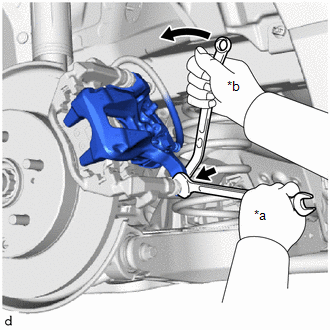
(c) Hold the rear disc brake cylinder slide pin and install the rear disc brake cylinder assembly to the rear disc brake cylinder mounting with a new bolt. Torque: 34.5 N·m {352 kgf·cm, 25 ft·lbf} |
|
(d) Depress the brake pedal several times.
3. ADD BRAKE FLUID
Click here
.gif)
4. INSTALL REAR WHEEL
Click here
5. NORMAL CONDITION RECOVERY
Click here
 Removal
REMOVAL
CAUTION / NOTICE / HINT
HINT:
The following procedure is for the LH side.
Use the same procedure for the RH side and LH side.
PROCEDURE
1. PRECAUTION
Click here
2. ...
 Rear Side Marker Light Bulb
Components
COMPONENTS
ILLUSTRATION
*1
REAR COMBINATION LIGHT ASSEMBLY
*2
REAR COMBINATION LIGHT COVER
*3
REAR SIDE MARKER ...
Other materials:
Toyota CH-R Service Manual > Navigation System: Terminals Of Ecu
TERMINALS OF ECU
HINT:
Check from the rear of the connector while it is connected to the components.
RADIO AND DISPLAY RECEIVER ASSEMBLY
Terminal No. (Symbol)
Wiring Color
Terminal Description
Condition
Specified Condition
...
Toyota CH-R Service Manual > Rear Axle Hub: On-vehicle Inspection
ON-VEHICLE INSPECTION
CAUTION / NOTICE / HINT
HINT:
Use the same procedure for the RH side and LH side.
The following procedure is for the LH side.
PROCEDURE
1. REMOVE REAR WHEEL
Click here
2. SEPARATE REAR DISC BRAKE CALIPER ASSEMBLY
Click here
3. REMOVE REAR DI ...
Toyota C-HR (AX20) 2023-2026 Owner's Manual
Toyota CH-R Owners Manual
- For safety and security
- Instrument cluster
- Operation of each component
- Driving
- Interior features
- Maintenance and care
- When trouble arises
- Vehicle specifications
- For owners
Toyota CH-R Service Manual
- Introduction
- Maintenance
- Audio / Video
- Cellular Communication
- Navigation / Multi Info Display
- Park Assist / Monitoring
- Brake (front)
- Brake (rear)
- Brake Control / Dynamic Control Systems
- Brake System (other)
- Parking Brake
- Axle And Differential
- Drive Shaft / Propeller Shaft
- K114 Cvt
- 3zr-fae Battery / Charging
- Networking
- Power Distribution
- Power Assist Systems
- Steering Column
- Steering Gear / Linkage
- Alignment / Handling Diagnosis
- Front Suspension
- Rear Suspension
- Tire / Wheel
- Tire Pressure Monitoring
- Door / Hatch
- Exterior Panels / Trim
- Horn
- Lighting (ext)
- Mirror (ext)
- Window / Glass
- Wiper / Washer
- Door Lock
- Heating / Air Conditioning
- Interior Panels / Trim
- Lighting (int)
- Meter / Gauge / Display
- Mirror (int)
- Power Outlets (int)
- Pre-collision
- Seat
- Seat Belt
- Supplemental Restraint Systems
- Theft Deterrent / Keyless Entry

0.0095