
Toyota CH-R Service Manual: ECU Power Source Circuit
DESCRIPTION
This circuit supplies power to the millimeter wave radar sensor assembly when the ignition switch is ON.
WIRING DIAGRAM
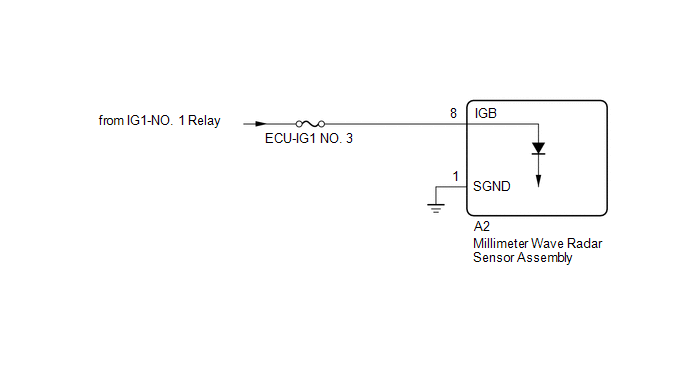
CAUTION / NOTICE / HINT
NOTICE:
Inspect the fuses for circuits related to this system before performing the following inspection procedure.
PROCEDURE
|
1. |
CHECK MILLIMETER WAVE RADAR SENSOR ASSEMBLY (IGB VOLTAGE) |
|
(a) Disconnect the millimeter wave radar sensor assembly connector. |
|
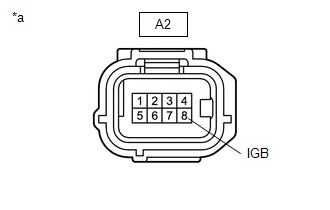
(b) Turn the ignition switch to ON.
(c) Measure the voltage according to the value(s) in the table below.
Standard Voltage:
|
Tester Connection |
Switch Condition |
Specified Condition |
|---|---|---|
|
A2-8 (IGB) - Body ground |
Ignition switch ON |
11 to 14 V |
(d) Turn the ignition switch off.
(e) Reconnect the millimeter wave radar sensor assembly connector.
| NG | .gif) |
REPAIR OR REPLACE HARNESS OR CONNECTOR (POWER SOURCE CIRCUIT) |
|
.gif)
|
2. |
CHECK HARNESS AND CONNECTOR (MILLIMETER WAVE RADAR SENSOR ASSEMBLY - BODY GROUND) |
|
(a) Disconnect the millimeter wave radar sensor assembly connector. |
|
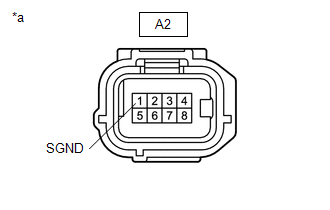
(b) Measure the resistance according to the value(s) in the table below.
Standard Resistance:
|
Tester Connection |
Condition |
Specified Condition |
|---|---|---|
|
A2-1 (SGND) - Body ground |
Always |
Below 1 Ω |
(c) Connect the millimeter wave radar sensor assembly connector.
| OK | |
PROCEED TO NEXT SUSPECTED AREA SHOWN IN PROBLEM SYMPTOMS TABLE |
| NG | |
REPAIR OR REPLACE HARNESS OR CONNECTOR |
 Front Radar Sensor (C1A10)
DESCRIPTION
C1A10 is output when there is an internal malfunction in the millimeter wave
radar sensor assembly.
DTC No.
Detection Item
DTC Detection Condition
...
 Pre-collision System Warning Buzzer
Components
COMPONENTS
ILLUSTRATION
*1
PRE-COLLISION CITY BUZZER
-
-
Removal
REMOVAL
PROCEDURE
1. REMOVE FUSE BOX OPENING COVER
Click ...
Other materials:
Toyota CH-R Service Manual > Spiral Cable: Components
COMPONENTS
ILLUSTRATION
*1
LOWER STEERING COLUMN COVER SUB-ASSEMBLY
*2
SPIRAL CABLE WITH SENSOR SUB-ASSEMBLY
*3
UPPER STEERING COLUMN COVER
-
-
...
Toyota CH-R Service Manual > Continuously Variable Transaxle System: Parts Location
PARTS LOCATION
ILLUSTRATION
*1
ECM
*2
SKID CONTROL ECU (BRAKE ACTUATOR ASSEMBLY)
*3
NO. 1 ENGINE ROOM RELAY BLOCK
- EFI-MAIN NO. 1 RELAY
- EFI-MAIN NO. 1 FUSE
- EFI NO. 2 FUSE
- ECU-IG2 NO. 1 FUSE
- ECU-B NO. ...
Toyota C-HR (AX20) 2023-2026 Owner's Manual
Toyota CH-R Owners Manual
- For safety and security
- Instrument cluster
- Operation of each component
- Driving
- Interior features
- Maintenance and care
- When trouble arises
- Vehicle specifications
- For owners
Toyota CH-R Service Manual
- Introduction
- Maintenance
- Audio / Video
- Cellular Communication
- Navigation / Multi Info Display
- Park Assist / Monitoring
- Brake (front)
- Brake (rear)
- Brake Control / Dynamic Control Systems
- Brake System (other)
- Parking Brake
- Axle And Differential
- Drive Shaft / Propeller Shaft
- K114 Cvt
- 3zr-fae Battery / Charging
- Networking
- Power Distribution
- Power Assist Systems
- Steering Column
- Steering Gear / Linkage
- Alignment / Handling Diagnosis
- Front Suspension
- Rear Suspension
- Tire / Wheel
- Tire Pressure Monitoring
- Door / Hatch
- Exterior Panels / Trim
- Horn
- Lighting (ext)
- Mirror (ext)
- Window / Glass
- Wiper / Washer
- Door Lock
- Heating / Air Conditioning
- Interior Panels / Trim
- Lighting (int)
- Meter / Gauge / Display
- Mirror (int)
- Power Outlets (int)
- Pre-collision
- Seat
- Seat Belt
- Supplemental Restraint Systems
- Theft Deterrent / Keyless Entry

0.0066