
Toyota CH-R Service Manual: Removal
REMOVAL
CAUTION / NOTICE / HINT
The necessary procedures (adjustment, calibration, initialization, or registration) that must be performed after parts are removed, installed, or replaced during the rear door courtesy switch removal/installation are shown below.
Necessary Procedures After Parts Removed/Installed/Replaced|
Replacement Part or Procedure |
Necessary Procedure |
Effect/Inoperative when not Performed |
Link |
|---|---|---|---|
|
Disconnect cable from negative battery terminal |
Initialize back door lock |
Power door lock control system |
|
|
Memorize steering angle neutral point |
Lane departure alert system (w/ Steering Control) |
|
|
|
Pre-collision system |
HINT:
- Use the same procedure for the LH and RH sides.
- The procedure described below is for the LH side.
PROCEDURE
1. REMOVE REAR SEAT ASSEMBLY
Click here .gif)
2. REMOVE REAR DOOR SCUFF PLATE (w/ Rear Seat Side Airbag)
Click here
3. REMOVE REAR DOOR SCUFF PLATE (w/o Rear Seat Side Airbag)
Click here
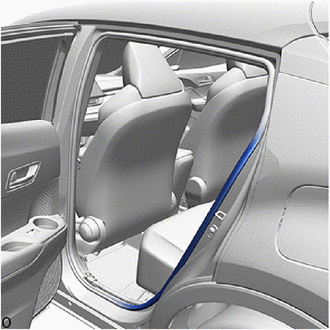
4. DISCONNECT REAR DOOR OPENING TRIM WEATHERSTRIP
|
(a) Disconnect the rear door opening trim weatherstrip from the area shown in the illustration. |
|
5. REMOVE REAR SEATBACK HINGE SUB-ASSEMBLY
Click here
6. REMOVE REAR PILLAR COVER (w/ Rear Seat Side Airbag)
Click here
7. REMOVE REAR SEAT SIDE GARNISH (w/ Rear Seat Side Airbag)
Click here
8. REMOVE REAR SEAT SIDE GARNISH (w/o Rear Seat Side Airbag)
Click here
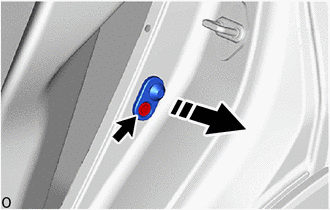
9. REMOVE REAR DOOR COURTESY LIGHT SWITCH ASSEMBLY
(a) Disconnect the connector.
(b) Using a T30 "TORX" socket wrench, remove the screw and rear door courtesy light switch assembly.
.png) |
Remove in this Direction |
 Inspection
INSPECTION
PROCEDURE
1. INSPECT REAR DOOR COURTESY LIGHT SWITCH ASSEMBLY
(a) Check the resistance.
(1) Measure the resistance according to the value(s) in the table below.
Standard ...
 Installation
INSTALLATION
CAUTION / NOTICE / HINT
HINT:
Use the same procedure for the LH and RH sides.
The procedure described below is for the LH side.
PROCEDURE
1. INSTALL REAR DOOR COURT ...
Other materials:
Toyota CH-R Service Manual > Rear Door: Reassembly
REASSEMBLY
CAUTION / NOTICE / HINT
HINT:
Use the same procedure for the RH side and LH side.
The following procedure is for the LH side.
PROCEDURE
1. INSTALL REAR DOOR OUTSIDE STRIPE
Click here
2. INSTALL REAR DOOR LOWER OUTSIDE STRIPE
Click here
3. INSTALL REAR DO ...
Toyota CH-R Service Manual > Front Axle Hub: Removal
REMOVAL
CAUTION / NOTICE / HINT
The necessary procedures (adjustment, calibration, initialization, or registration)
that must be performed after parts are removed and installed, or replaced during
front axle hub sub-assembly removal/installation are shown below.
Necessary Procedures After Par ...
Toyota C-HR (AX20) 2023-2026 Owner's Manual
Toyota CH-R Owners Manual
- For safety and security
- Instrument cluster
- Operation of each component
- Driving
- Interior features
- Maintenance and care
- When trouble arises
- Vehicle specifications
- For owners
Toyota CH-R Service Manual
- Introduction
- Maintenance
- Audio / Video
- Cellular Communication
- Navigation / Multi Info Display
- Park Assist / Monitoring
- Brake (front)
- Brake (rear)
- Brake Control / Dynamic Control Systems
- Brake System (other)
- Parking Brake
- Axle And Differential
- Drive Shaft / Propeller Shaft
- K114 Cvt
- 3zr-fae Battery / Charging
- Networking
- Power Distribution
- Power Assist Systems
- Steering Column
- Steering Gear / Linkage
- Alignment / Handling Diagnosis
- Front Suspension
- Rear Suspension
- Tire / Wheel
- Tire Pressure Monitoring
- Door / Hatch
- Exterior Panels / Trim
- Horn
- Lighting (ext)
- Mirror (ext)
- Window / Glass
- Wiper / Washer
- Door Lock
- Heating / Air Conditioning
- Interior Panels / Trim
- Lighting (int)
- Meter / Gauge / Display
- Mirror (int)
- Power Outlets (int)
- Pre-collision
- Seat
- Seat Belt
- Supplemental Restraint Systems
- Theft Deterrent / Keyless Entry

0.0076