
Toyota CH-R Owners Manual: Setting the vehicle speed (vehicle-to-vehicle distance control mode)
1. Press the "ON-OFF" button to activate the cruise control.
Radar cruise control indicator will come on and a message will be displayed on the multi-information display.
Press the button again to deactivate the cruise control.
If the "ON-OFF" button is pressed and held for 1.5 seconds or more, the system turns on in constant speed control mode.
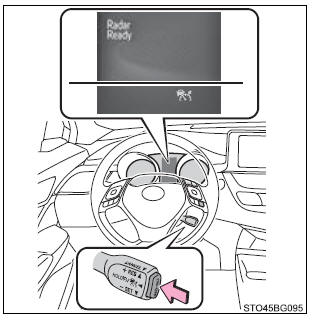
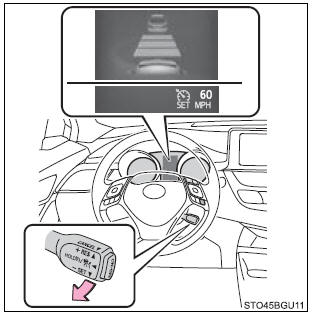
2. Accelerate or decelerate, with accelerator pedal operation, to the desired vehicle speed (at or above approximately 30 mph [50 km/h]) and push the lever down to set the speed.
Cruise control "SET" indicator will come on.
The vehicle speed at the moment the lever is released becomes the set speed.
If the lever is operated while the vehicle speed is below approximately 30 mph (50 km/h) and a preceding vehicle is present, the set speed will be adjusted to approximately 30 mph (50 km/h).
 Driving in vehicle-to-vehicle distance control mode
This mode employs a radar sensor to detect the presence of vehicles up to approximately
328 ft. (100 m) ahead, determines the current vehicle-to-vehicle following distance,
and operates to maintai ...
 Adjusting the set speed
To change the set speed, operate the lever until the desired set speed is displayed.
Increases the speed
(Except when the vehicle has been stopped by system control in vehicle- to-vehicle
dis ...
Other materials:
Toyota CH-R Service Manual > Audio And Visual System(for Radio And Display Type): System Description
SYSTEM DESCRIPTION
USB AUDIO SYSTEM FUNCTION OUTLINE
(a) The No. 1 stereo jack adapter assembly is equipped with a USB connector.
Connecting a USB device or "iPod" to the No. 1 stereo jack adapter assembly allows
music files to be played. Not only is it possible to play music from a ...
Toyota CH-R Service Manual > Roof Headlining: Components
COMPONENTS
ILLUSTRATION
*A
w/ Package Tray Trim
*B
w/ Tonneau Cover
*1
PACKAGE TRAY TRIM PANEL ASSEMBLY
*2
TONNEAU COVER ASSEMBLY
ILLUSTRATION
*A
for Type A
...
Toyota C-HR (AX20) 2023-2026 Owner's Manual
Toyota CH-R Owners Manual
- For safety and security
- Instrument cluster
- Operation of each component
- Driving
- Interior features
- Maintenance and care
- When trouble arises
- Vehicle specifications
- For owners
Toyota CH-R Service Manual
- Introduction
- Maintenance
- Audio / Video
- Cellular Communication
- Navigation / Multi Info Display
- Park Assist / Monitoring
- Brake (front)
- Brake (rear)
- Brake Control / Dynamic Control Systems
- Brake System (other)
- Parking Brake
- Axle And Differential
- Drive Shaft / Propeller Shaft
- K114 Cvt
- 3zr-fae Battery / Charging
- Networking
- Power Distribution
- Power Assist Systems
- Steering Column
- Steering Gear / Linkage
- Alignment / Handling Diagnosis
- Front Suspension
- Rear Suspension
- Tire / Wheel
- Tire Pressure Monitoring
- Door / Hatch
- Exterior Panels / Trim
- Horn
- Lighting (ext)
- Mirror (ext)
- Window / Glass
- Wiper / Washer
- Door Lock
- Heating / Air Conditioning
- Interior Panels / Trim
- Lighting (int)
- Meter / Gauge / Display
- Mirror (int)
- Power Outlets (int)
- Pre-collision
- Seat
- Seat Belt
- Supplemental Restraint Systems
- Theft Deterrent / Keyless Entry

0.0084