
Toyota CH-R Service Manual: Installation
INSTALLATION
CAUTION / NOTICE / HINT
HINT:
- Use the same procedure for the RH side and LH side.
- The following procedure is for the LH side.
PROCEDURE
1. INSTALL DOOR SIDE AIRBAG SENSOR
(a) Check that the ignition switch off.
(b) Check that the cable is disconnected from the negative (-) battery terminal.
CAUTION:
Wait at least 90 seconds after disconnecting the cable from the negative (-) battery terminal to disable the SRS system.
.png)
(c) Connect the connector to the door side airbag sensor.
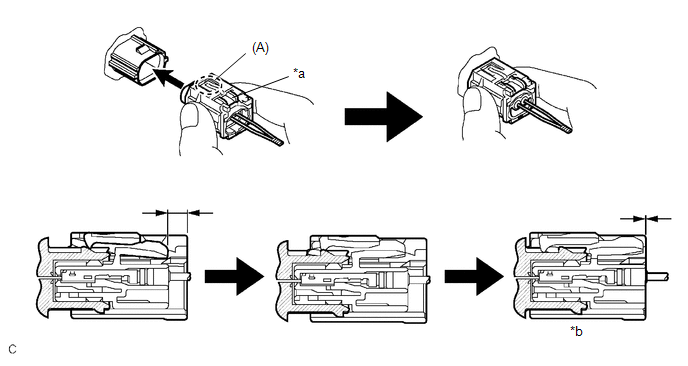
|
*a |
White Housing Lock |
*b |
Connection is completed |
NOTICE:
When connecting any airbag connector, take care not to damage the airbag wire harness.
HINT:
- Be sure to connect the connector until it is locked (when locking, make sure that a click sound can be heard).
- When the connector is locked, the white housing lock will slide. Do not hold the white housing lock or the part (A) as it may result in an insecure connection.
(d) Before connecting the connector, check that the position of the white housing lock is as shown in the illustration.
.png)
|
*a |
Incorrect |
*b |
Correct |
|
(e) Engage the claw to install the door side airbag sensor with the nut. Torque: 9.0 N·m {92 kgf·cm, 80 in·lbf} NOTICE:
|
|
.png)
(f) Check that there is no looseness in the installed parts of the door side airbag sensor.
2. INSTALL FRONT DOOR SERVICE HOLE COVER
Click here .gif)
3. INSTALL FRONT DOOR TRIM BOARD SUB-ASSEMBLY
Click here
4. INSTALL MULTIPLEX NETWORK MASTER SWITCH ASSEMBLY WITH FRONT ARMREST BASE UPPER PANEL (for Driver Side)
Click here
5. INSTALL POWER WINDOW REGULATOR SWITCH ASSEMBLY WITH FRONT ARMREST BASE UPPER PANEL (for Front Passenger Side)
Click here
6. INSTALL FRONT DOOR INSIDE HANDLE BEZEL PLUG
Click here
7. CONNECT CABLE TO NEGATIVE BATTERY TERMINAL
Click here
NOTICE:
When disconnecting the cable, some systems need to be initialized after the cable is reconnected.
Click here
8. INSPECT POWER WINDOW OPERATION
Click here
9. PERFORM DIAGNOSTIC SYSTEM CHECK
Click here
10. INSPECT SRS WARNING LIGHT
Click here
 Removal
REMOVAL
CAUTION / NOTICE / HINT
The necessary procedures (adjustment, calibration, initialization, or registration)
that must be performed after parts are removed, installed, or replaced during th ...
 Spiral Cable
...
Other materials:
Toyota CH-R Service Manual > Vehicle Stability Control System: Performance Decline of Brake Function (C1441)
DESCRIPTION
The skid control ECU judges brake failure conditions have occurred based on signals
from the brake pedal load sensing switch and master cylinder pressure sensor.
NOTICE:
Do not intentionally stop the engine when driving. Even when no malfunction has
occurred in the brake system, D ...
Toyota CH-R Service Manual > Air Conditioning Unit(for Valeo Made): Removal
REMOVAL
CAUTION / NOTICE / HINT
The necessary procedures (adjustment, calibration, initialization, or registration)
that must be performed after parts are removed, installed, or replaced during the
air conditioner unit assembly removal/installation are shown below.
Necessary Procedure After P ...
Toyota C-HR (AX20) 2023-2026 Owner's Manual
Toyota CH-R Owners Manual
- For safety and security
- Instrument cluster
- Operation of each component
- Driving
- Interior features
- Maintenance and care
- When trouble arises
- Vehicle specifications
- For owners
Toyota CH-R Service Manual
- Introduction
- Maintenance
- Audio / Video
- Cellular Communication
- Navigation / Multi Info Display
- Park Assist / Monitoring
- Brake (front)
- Brake (rear)
- Brake Control / Dynamic Control Systems
- Brake System (other)
- Parking Brake
- Axle And Differential
- Drive Shaft / Propeller Shaft
- K114 Cvt
- 3zr-fae Battery / Charging
- Networking
- Power Distribution
- Power Assist Systems
- Steering Column
- Steering Gear / Linkage
- Alignment / Handling Diagnosis
- Front Suspension
- Rear Suspension
- Tire / Wheel
- Tire Pressure Monitoring
- Door / Hatch
- Exterior Panels / Trim
- Horn
- Lighting (ext)
- Mirror (ext)
- Window / Glass
- Wiper / Washer
- Door Lock
- Heating / Air Conditioning
- Interior Panels / Trim
- Lighting (int)
- Meter / Gauge / Display
- Mirror (int)
- Power Outlets (int)
- Pre-collision
- Seat
- Seat Belt
- Supplemental Restraint Systems
- Theft Deterrent / Keyless Entry

0.008