
Toyota CH-R Service Manual: Rear Turn Signal Light Bulb
Components
COMPONENTS
ILLUSTRATION
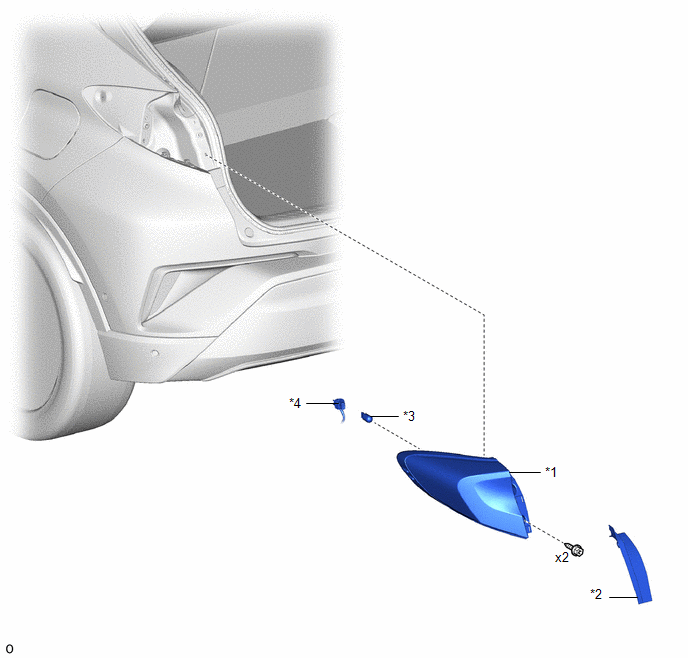
|
*1 |
REAR COMBINATION LIGHT ASSEMBLY |
*2 |
REAR COMBINATION LIGHT COVER |
|
*3 |
REAR TURN SIGNAL LIGHT BULB |
*4 |
REAR COMBINATION LIGHT SOCKET AND WIRE |
Removal
REMOVAL
CAUTION / NOTICE / HINT
HINT:
- Use the same procedure for the RH and LH sides.
- The procedure listed below is for the LH side.
PROCEDURE
1. REMOVE REAR COMBINATION LIGHT COVER
Click here
.gif)
2. REMOVE REAR COMBINATION LIGHT ASSEMBLY
Click here
3. REMOVE REAR TURN SIGNAL LIGHT BULB
(a) Turn the rear combination light socket and wire with the rear turn signal light bulb as shown in the illustration to disconnect them as a unit.
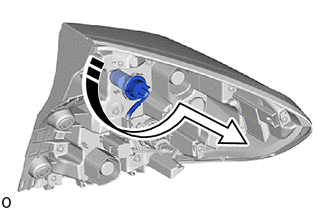
.png) |
Remove in this Direction |
(b) Remove the rear turn signal light bulb from the rear combination light socket and wire as shown in the illustration.
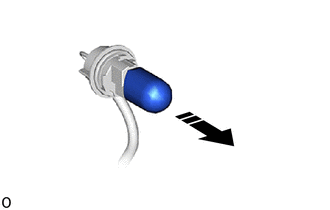
|
|
Remove in this Direction |
Installation
INSTALLATION
CAUTION / NOTICE / HINT
HINT:
- Use the same procedure for the RH and LH sides.
- The procedure listed below is for the LH side.
PROCEDURE
1. INSTALL REAR TURN SIGNAL LIGHT BULB
(a) Install the rear turn signal light bulb to the rear combination light socket and wire as shown in the illustration.
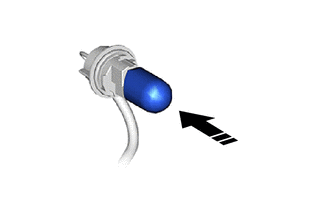
.png) |
Install in this Direction |
(b) Turn the rear combination light socket and wire with the rear turn signal light bulb as shown in the illustration to connect them as a unit.
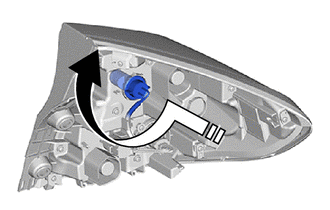
|
|
Install in this Direction |
2. INSTALL REAR COMBINATION LIGHT ASSEMBLY
Click here
.gif)
3. INSTALL REAR COMBINATION LIGHT COVER
Click here
 Rear Side Marker Light Bulb
Components
COMPONENTS
ILLUSTRATION
*1
REAR COMBINATION LIGHT ASSEMBLY
*2
REAR COMBINATION LIGHT COVER
*3
REAR SIDE MARKER ...

Other materials:
Toyota CH-R Service Manual > Curtain Shield Airbag Assembly: On-vehicle Inspection
ON-VEHICLE INSPECTION
CAUTION / NOTICE / HINT
CAUTION:
Be sure to correctly follow the removal and installation procedures for the curtain
shield airbag assemblies.
PROCEDURE
1. INSPECT CURTAIN SHIELD AIRBAG ASSEMBLY (for Vehicle not Involved in Collision)
(a) Perform a diagnostic system che ...
Toyota CH-R Service Manual > Power Steering System: TC and CG Terminal Circuit
DESCRIPTION
Connecting terminals TC and CG of the DLC3 causes the ECU to display DTCs by
blinking the EPS warning light.
WIRING DIAGRAM
CAUTION / NOTICE / HINT
NOTICE:
If the power steering ECU assembly has been replaced, perform assist map writing
and torque sensor zero point calibration ...
Toyota C-HR (AX20) 2023-2026 Owner's Manual
Toyota CH-R Owners Manual
- For safety and security
- Instrument cluster
- Operation of each component
- Driving
- Interior features
- Maintenance and care
- When trouble arises
- Vehicle specifications
- For owners
Toyota CH-R Service Manual
- Introduction
- Maintenance
- Audio / Video
- Cellular Communication
- Navigation / Multi Info Display
- Park Assist / Monitoring
- Brake (front)
- Brake (rear)
- Brake Control / Dynamic Control Systems
- Brake System (other)
- Parking Brake
- Axle And Differential
- Drive Shaft / Propeller Shaft
- K114 Cvt
- 3zr-fae Battery / Charging
- Networking
- Power Distribution
- Power Assist Systems
- Steering Column
- Steering Gear / Linkage
- Alignment / Handling Diagnosis
- Front Suspension
- Rear Suspension
- Tire / Wheel
- Tire Pressure Monitoring
- Door / Hatch
- Exterior Panels / Trim
- Horn
- Lighting (ext)
- Mirror (ext)
- Window / Glass
- Wiper / Washer
- Door Lock
- Heating / Air Conditioning
- Interior Panels / Trim
- Lighting (int)
- Meter / Gauge / Display
- Mirror (int)
- Power Outlets (int)
- Pre-collision
- Seat
- Seat Belt
- Supplemental Restraint Systems
- Theft Deterrent / Keyless Entry

0.0071