
Toyota CH-R Service Manual: Removal
REMOVAL
CAUTION / NOTICE / HINT
The necessary procedures (adjustment, calibration, initialization, or registration) that must be performed after parts are removed, installed, or replaced during the lumbar support adjuster assembly removal/installation are shown below.
Necessary Procedure After Parts Removed/Installed/Replaced|
Replacement Part or Procedure |
Necessary Procedures |
Effects / Inoperative when not performed |
Link |
|---|---|---|---|
|
Disconnect cable from negative battery terminal |
Initialize back door lock |
Power door lock control system |
|
|
Memorize steering angle neutral point |
Lane departure alert system (w/ Steering Control) |
|
|
|
Pre-collision system |
CAUTION:
- Be sure to read Precaution thoroughly before servicing.
.gif)
.png)
- Wear protective gloves. Sharp areas on the parts may injure your hands.
HINT:
Lumbar support adjuster assembly is available only on the driver side.
PROCEDURE
1. REMOVE SEPARATE TYPE FRONT SEATBACK COVER WITH PAD
Click here
2. REMOVE LUMBAR SUPPORT ADJUSTER ASSEMBLY
|
(a) Disconnect the connector. |
|
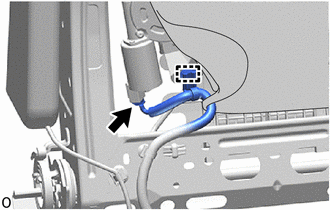
(b) Disengage the clamp.
|
(c) Disengage the claws to separate the 2 front seatback edge protectors from the front seatback frame sub-assembly. |
|
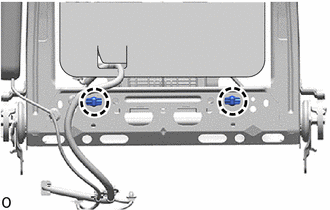
(d) Disengage the guides to remove the lumbar support adjuster assembly from the front seatback frame sub-assembly as shown in the illustration.
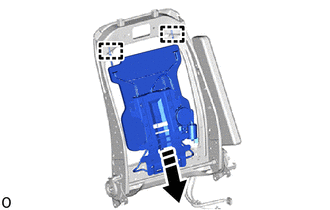
.png) |
Remove in this Direction |
|
(e) Remove the 2 front seatback edge protectors from the lumbar support adjuster assembly. |
|
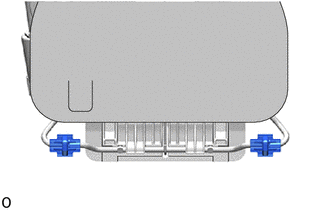
 Components
COMPONENTS
ILLUSTRATION
*1
LUMBAR SUPPORT ADJUSTER ASSEMBLY
*2
FRONT SEATBACK EDGE PROTECTOR
...
 Inspection
INSPECTION
PROCEDURE
1. INSPECT LUMBAR SUPPORT ADJUSTER ASSEMBLY
(a) Check the operation of the lumbar support adjuster assembly.
(1) Apply battery voltage to the lumbar motor connect ...
Other materials:
Toyota CH-R Service Manual > Navigation System: Main Body ECU Vehicle Information Reading/Writing Process Malfunction (B15F6)
DESCRIPTION
This DTC is stored when items controlled by the main body ECU (multiplex network
body ECU) cannot be customized via the navigation system vehicle customization screen.
HINT:
The main body ECU (multiplex network body ECU) controls the items for the following
systems that are custom ...
Toyota CH-R Service Manual > Rear Bumper: Reassembly
REASSEMBLY
PROCEDURE
1. INSTALL REAR BUMPER ARM SUB-ASSEMBLY LH (for USA and Canada)
(a) Install the rear bumper arm sub-assembly LH with the 4 bolts.
Torque:
18 N·m {184 kgf·cm, 13 ft·lbf}
2. INSTALL REAR BUMPER ARM SUB-ASSEMB ...
Toyota C-HR (AX20) 2023-2026 Owner's Manual
Toyota CH-R Owners Manual
- For safety and security
- Instrument cluster
- Operation of each component
- Driving
- Interior features
- Maintenance and care
- When trouble arises
- Vehicle specifications
- For owners
Toyota CH-R Service Manual
- Introduction
- Maintenance
- Audio / Video
- Cellular Communication
- Navigation / Multi Info Display
- Park Assist / Monitoring
- Brake (front)
- Brake (rear)
- Brake Control / Dynamic Control Systems
- Brake System (other)
- Parking Brake
- Axle And Differential
- Drive Shaft / Propeller Shaft
- K114 Cvt
- 3zr-fae Battery / Charging
- Networking
- Power Distribution
- Power Assist Systems
- Steering Column
- Steering Gear / Linkage
- Alignment / Handling Diagnosis
- Front Suspension
- Rear Suspension
- Tire / Wheel
- Tire Pressure Monitoring
- Door / Hatch
- Exterior Panels / Trim
- Horn
- Lighting (ext)
- Mirror (ext)
- Window / Glass
- Wiper / Washer
- Door Lock
- Heating / Air Conditioning
- Interior Panels / Trim
- Lighting (int)
- Meter / Gauge / Display
- Mirror (int)
- Power Outlets (int)
- Pre-collision
- Seat
- Seat Belt
- Supplemental Restraint Systems
- Theft Deterrent / Keyless Entry

0.0107