
Toyota CH-R Service Manual: Removal
REMOVAL
PROCEDURE
1. REMOVE FRONT DOOR SCUFF PLATE LH
Click here .gif)
2. REMOVE COWL SIDE TRIM BOARD LH
Click here
3. REMOVE NO. 1 INSTRUMENT PANEL UNDER COVER SUB-ASSEMBLY
Click here
4. REMOVE INSTRUMENT CLUSTER FINISH PANEL GARNISH ASSEMBLY
Click here
5. REMOVE INSTRUMENT PANEL LOWER CENTER FINISH PANEL
Click here
6. REMOVE INSTRUMENT PANEL BOX ASSEMBLY
Click here
7. REMOVE SHIFT LEVER KNOB SUB-ASSEMBLY
Click here
8. REMOVE CONSOLE UPPER PANEL SUB-ASSEMBLY
Click here
9. REMOVE CONSOLE BOX CUP HOLDER
Click here
10. REMOVE NO. 2 CONSOLE BOX CUP HOLDER
Click here
11. REMOVE INSTRUMENT CLUSTER FINISH PANEL GARNISH
(a) Disengage the claws to remove the instrument cluster finish panel garnish as shown in the illustration.
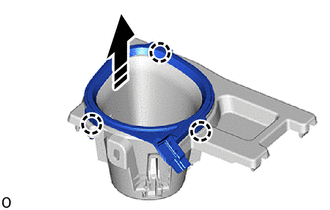
.png) |
Remove in this Direction |
12. REMOVE INSTRUMENT CLUSTER FINISH PANEL CENTER GARNISH
(a) Disengage the claws to remove the instrument cluster finish panel center garnish as shown in the illustration.
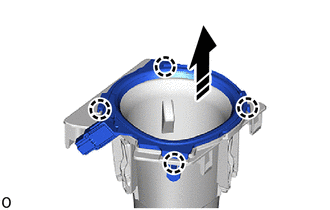
|
|
Remove in this Direction |
 Components
COMPONENTS
ILLUSTRATION
*1
COWL SIDE TRIM BOARD LH
*2
FRONT DOOR SCUFF PLATE LH
*3
INSTRUMENT CLUSTER FINISH PANEL GARNISH A ...
 Inspection
INSPECTION
PROCEDURE
1. INSPECT INSTRUMENT CLUSTER FINISH PANEL GARNISH
(a) Check that the LED illuminates.
(1) Apply battery voltage to the instrument cluster finish panel garnish
...
Other materials:
Toyota CH-R Service Manual > Steering Column Assembly: Installation
INSTALLATION
PROCEDURE
1. ALIGN FRONT WHEELS FACING STRAIGHT AHEAD
2. INSTALL STEERING COLUMN ASSEMBLY
NOTICE:
Make sure that the wire harness is not interfering with the steering column assembly.
(a) Install the steering column assembly with the bolt and 2 nuts.
Torque:
36 N·m {367 kgf·c ...
Toyota CH-R Owners Manual > Dynamic radar cruise control with full-speed range: Driving in vehicle-to-vehicle distance control mode
This mode employs a radar sensor to detect the presence of vehicles up to approximately
328 ft. (100 m) ahead, determines the current vehicle-to-vehicle following distance,
and operates to maintain a suitable following distance from the vehicle ahead.
Note that vehicle-to-vehicle distance will ...
Toyota C-HR (AX20) 2023-2026 Owner's Manual
Toyota CH-R Owners Manual
- For safety and security
- Instrument cluster
- Operation of each component
- Driving
- Interior features
- Maintenance and care
- When trouble arises
- Vehicle specifications
- For owners
Toyota CH-R Service Manual
- Introduction
- Maintenance
- Audio / Video
- Cellular Communication
- Navigation / Multi Info Display
- Park Assist / Monitoring
- Brake (front)
- Brake (rear)
- Brake Control / Dynamic Control Systems
- Brake System (other)
- Parking Brake
- Axle And Differential
- Drive Shaft / Propeller Shaft
- K114 Cvt
- 3zr-fae Battery / Charging
- Networking
- Power Distribution
- Power Assist Systems
- Steering Column
- Steering Gear / Linkage
- Alignment / Handling Diagnosis
- Front Suspension
- Rear Suspension
- Tire / Wheel
- Tire Pressure Monitoring
- Door / Hatch
- Exterior Panels / Trim
- Horn
- Lighting (ext)
- Mirror (ext)
- Window / Glass
- Wiper / Washer
- Door Lock
- Heating / Air Conditioning
- Interior Panels / Trim
- Lighting (int)
- Meter / Gauge / Display
- Mirror (int)
- Power Outlets (int)
- Pre-collision
- Seat
- Seat Belt
- Supplemental Restraint Systems
- Theft Deterrent / Keyless Entry

0.0106