
Toyota CH-R Service Manual: 3zr-fae Drive Belt
Components
COMPONENTS
ILLUSTRATION
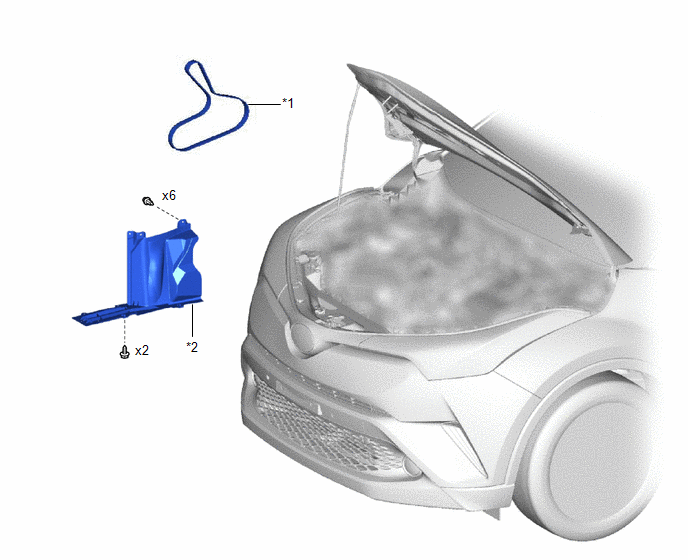
|
*1 |
FAN AND GENERATOR V BELT |
*2 |
REAR ENGINE UNDER COVER RH |
Removal
REMOVAL
PROCEDURE
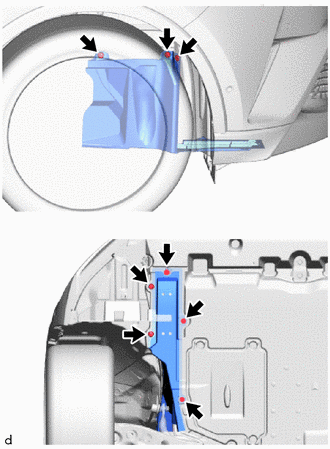
1. REMOVE REAR ENGINE UNDER COVER RH
|
(a) Remove the 2 screws, 6 clips and rear engine under cover RH from the vehicle. |
|
2. REMOVE FAN AND GENERATOR V BELT
|
(a) Attach a wrench to the hexagonal portion (A) or (B) of the V-ribbed belt tensioner assembly as shown in the illustration. |
|
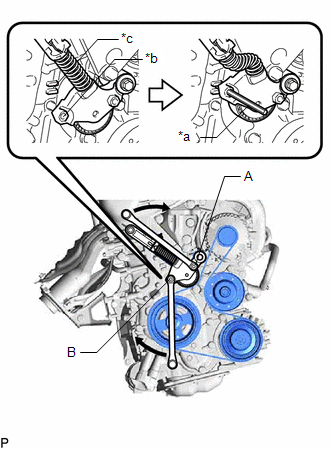
(b) Rotate the V-ribbed belt tensioner assembly clockwise to align the hole with the gap, and then insert a 5 mm bi-hexagon wrench into the hole and gap to secure the V-ribbed belt tensioner assembly.
(c) Remove the fan and generator V belt from the V-ribbed belt tensioner assembly.
Installation
INSTALLATION
PROCEDURE
1. INSTALL FAN AND GENERATOR V BELT
|
(a) Set the fan and generator V belt onto every pulley. |
|
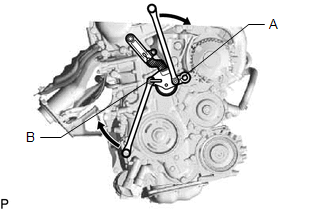
(b) Attach a wrench to the hexagonal portion (A) or (B) of the V-ribbed belt tensioner assembly as shown in the illustration, and while rotating the V-ribbed belt tensioner assembly clockwise, remove the 5 mm bi-hexagon wrench.
NOTICE:
Check that the fan and generator V belt is properly set to each pulley.
2. INSPECT FAN AND GENERATOR V BELT
Click here
.gif)
3. INSTALL REAR ENGINE UNDER COVER RH
(a) Install the rear engine under cover RH to the vehicle with the 2 screws and 6 clips.
 Replacement
REPLACEMENT
PROCEDURE
1. REMOVE NO. 1 ENGINE UNDER COVER
Click here
2. DRAIN ENGINE COOLANT
CAUTION:
When engine coolant is hot, do not remove the reserve tank cap, air
release ...

Other materials:
Toyota CH-R Service Manual > Can Communication System: Check Bus 3 Line for Short to +B
DESCRIPTION
There may be a short circuit between one of the CAN bus lines and +B when no
resistance exists between terminal 6 (CA3H) of the central gateway ECU (network
gateway ECU) and terminal 16 (BAT) of the DLC3, or terminal 21 (CA3L) of the central
gateway ECU (network gateway ECU) and t ...
Toyota CH-R Service Manual > Tire Pressure Monitoring: Tire Pressure Warning Receiver
Components
COMPONENTS
ILLUSTRATION
*A
for Type A
*B
for Type B
*1
TIRE PRESSURE WARNING ECU AND RECEIVER
-
-
N*m (kgf*cm, ft.*lbf): Specified torque
-
...
Toyota C-HR (AX20) 2023-2026 Owner's Manual
Toyota CH-R Owners Manual
- For safety and security
- Instrument cluster
- Operation of each component
- Driving
- Interior features
- Maintenance and care
- When trouble arises
- Vehicle specifications
- For owners
Toyota CH-R Service Manual
- Introduction
- Maintenance
- Audio / Video
- Cellular Communication
- Navigation / Multi Info Display
- Park Assist / Monitoring
- Brake (front)
- Brake (rear)
- Brake Control / Dynamic Control Systems
- Brake System (other)
- Parking Brake
- Axle And Differential
- Drive Shaft / Propeller Shaft
- K114 Cvt
- 3zr-fae Battery / Charging
- Networking
- Power Distribution
- Power Assist Systems
- Steering Column
- Steering Gear / Linkage
- Alignment / Handling Diagnosis
- Front Suspension
- Rear Suspension
- Tire / Wheel
- Tire Pressure Monitoring
- Door / Hatch
- Exterior Panels / Trim
- Horn
- Lighting (ext)
- Mirror (ext)
- Window / Glass
- Wiper / Washer
- Door Lock
- Heating / Air Conditioning
- Interior Panels / Trim
- Lighting (int)
- Meter / Gauge / Display
- Mirror (int)
- Power Outlets (int)
- Pre-collision
- Seat
- Seat Belt
- Supplemental Restraint Systems
- Theft Deterrent / Keyless Entry

0.0088