
Toyota CH-R Service Manual: How To Use This Manual
General Information
GENERAL INFORMATION
GENERAL DESCRIPTION
(a) Repair operations can be separated mainly into the following 3 processes:
(1) Diagnosis.
(2) Removing/Installing, Replacing, Disassembling/Reassembling, Checking and Adjusting.
(3) Final Inspection.
(b) The following procedures are omitted from this manual. However, these procedures must be performed.
(1) Use a jack or lift to perform operations.
(2) Clean all removed parts.
(3) Perform a visual check before and after performing any work.
PREPARATION
(a) Use of Special Service Tools (SST) and Special Service Materials (SSM) may be required, depending on the repair procedure. Be sure to use SST and SSM when they are required and follow the work procedure properly. A list of SST and SSM is in the "Preparation" section of this manual.
REPAIR PROCEDURES
(a) A component illustration is placed under the title where necessary.
(b) Non-reusable parts, grease application areas, precoated parts and torque specifications are noted in the component illustrations.
- The following illustration is an example.
|
Symbol |
Contents |
|---|---|
 |
Tightening torque for "Major areas involving basic vehicle performance such as moving/turning/stopping" : N*m (kgf*cm, ft.*lbf) |
 |
N*m (kgf*cm, ft.*lbf): Specified torque |
|
● |
Non-reusable part |
|
★ |
Precoated part |
 |
Apply Lubricant Here |
 |
Do not apply lubricants to the threaded parts |
CAUTION:
"Major areas involving basic vehicle performance such as moving/turning/stopping" indicates areas that require a higher degree of precision when tightening.
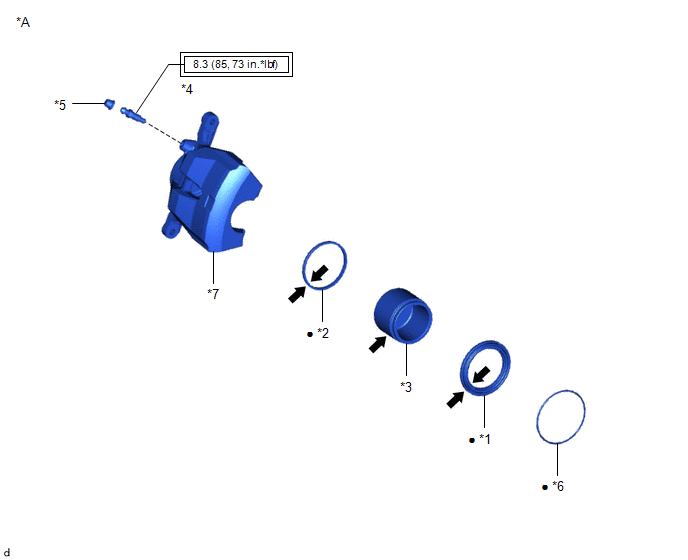
|
*A |
Example |
- |
- |
|
*1 |
CYLINDER BOOT |
*2 |
PISTON SEAL |
|
*3 |
FRONT DISC BRAKE PISTON |
*4 |
FRONT DISC BRAKE BLEEDER PLUG |
|
*5 |
FRONT DISC BRAKE BLEEDER PLUG CAP |
*6 |
SET RING |
|
*7 |
DISC BRAKE CYLINDER ASSEMBLY LH |
- |
- |
|
|
Tightening torque for "Major areas involving basic vehicle performance such as moving/turning/stopping" : N*m (kgf*cm, ft.*lbf) |
|
N*m (kgf*cm, ft.*lbf): Specified torque |
|
● |
Non-reusable part |
|
Lithium soap base glycol grease |
(c) Torque specifications, grease application areas and non-reusable parts are emphasized in the procedures.
HINT:
There are cases where such information can only be explained by using an illustration. In these cases, torque, oil and other information are described in the illustration.
(d) Only items with key points are described in the text. What to do and other details are explained using illustrations next to the text. Both the text and illustrations are accompanied by standard values and notices.
|
Illustration |
What to do and where to do it |
|
Task heading |
What work will be performed |
|
Explanation text |
|
(e) Illustrations of similar vehicle models are sometimes used. In these cases, minor details may be different from the actual vehicle.
(f) Procedures are presented in a step-by-step format.
SERVICE SPECIFICATIONS
(a) Specifications are presented in boldface text throughout the manual. The specifications are also found in the "Specifications" section for reference.
TERM DEFINITIONS
|
CAUTION |
Possibility of injury to you or other people. |
|
NOTICE |
Possibility of damage to components being repaired. |
|
HINT |
Provides additional information to help you perform repairs. |
INTERNATIONAL SYSTEM OF UNITS
(a) The units used in this manual comply with the International System of Units (SI UNIT) standard. Other units from the metric system and the English systems are also provided.
- Example:
Torque:
30 N·m {306 kgf·cm, 22 ft·lbf}
 How To Proceed With Troubleshooting
HOW TO PROCEED WITH TROUBLESHOOTING
OPERATION FLOW
HINT:
Perform troubleshooting in accordance with the procedure below. The following
is an outline of basic troubleshooting procedure. Confirm th ...
 Identification Information
Vehicle Identification And Serial Numbers
VEHICLE IDENTIFICATION AND SERIAL NUMBERS
VEHICLE IDENTIFICATION NUMBER
(a) The vehicle identification number is stamped on the vehicle body and on the
...
Other materials:
Toyota CH-R Service Manual > Park / Neutral Position Switch: Inspection
INSPECTION
PROCEDURE
1. INSPECT PARK/NEUTRAL POSITION SWITCH
*a
Component without harness connected
(Park/Neutral Position Switch)
(a) Measure the resistance according to the value(s) in the table below.
Standard Resistance:
Tester Connection
...
Toyota CH-R Owners Manual > Do-it-yourself maintenance: Tires
Replace or rotate tires in accordance with maintenance schedules
and treadwear.
Checking tires
Check if the treadwear indicators are showing on the tires. Also check the tires
for uneven wear, such as excessive wear on one side of the tread.
Check the spare tire condition and pressure if not ...
Toyota C-HR (AX20) 2023-2026 Owner's Manual
Toyota CH-R Owners Manual
- For safety and security
- Instrument cluster
- Operation of each component
- Driving
- Interior features
- Maintenance and care
- When trouble arises
- Vehicle specifications
- For owners
Toyota CH-R Service Manual
- Introduction
- Maintenance
- Audio / Video
- Cellular Communication
- Navigation / Multi Info Display
- Park Assist / Monitoring
- Brake (front)
- Brake (rear)
- Brake Control / Dynamic Control Systems
- Brake System (other)
- Parking Brake
- Axle And Differential
- Drive Shaft / Propeller Shaft
- K114 Cvt
- 3zr-fae Battery / Charging
- Networking
- Power Distribution
- Power Assist Systems
- Steering Column
- Steering Gear / Linkage
- Alignment / Handling Diagnosis
- Front Suspension
- Rear Suspension
- Tire / Wheel
- Tire Pressure Monitoring
- Door / Hatch
- Exterior Panels / Trim
- Horn
- Lighting (ext)
- Mirror (ext)
- Window / Glass
- Wiper / Washer
- Door Lock
- Heating / Air Conditioning
- Interior Panels / Trim
- Lighting (int)
- Meter / Gauge / Display
- Mirror (int)
- Power Outlets (int)
- Pre-collision
- Seat
- Seat Belt
- Supplemental Restraint Systems
- Theft Deterrent / Keyless Entry

0.0135