
Toyota CH-R Owners Manual: Other interior features
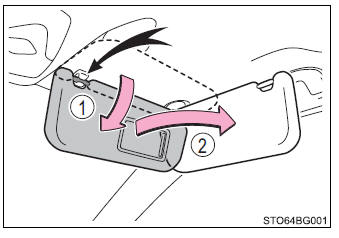
Sun visors
- To set the visor in the forward position, flip it down.
- To set the visor in the side position, flip down, unhook, and swing it to the side.
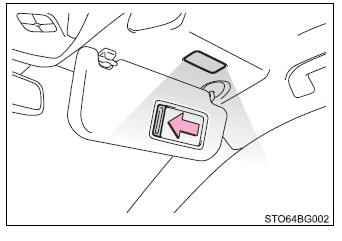
Vanity mirrors
Slide the cover to open.
The light turns on when the cover is opened. (if equipped)
Clock
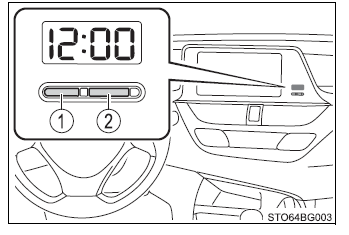
The clock can be adjusted by pressing and holding the buttons.
- Adjusts the hours
- Adjusts the minutes
- Vehicles without a smart key system: The clock is displayed when the engine
switch is in the "ACC" or "ON" position.
Vehicles with a smart key system: The clock is displayed when the engine switch is in ACCESSORY or IGNITION ON mode.
- When the battery terminals are disconnected and reconnected, the clock will automatically be set to 1:00.
Power outlet
Please use as a power supply for electronic goods that use less than 12 VDC/10 A (power consumption of 120 W).
1. Lift the lid while pulling up the knob and open the console box.
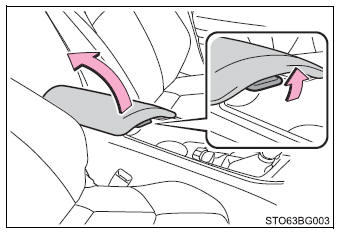
2. Open the cover.
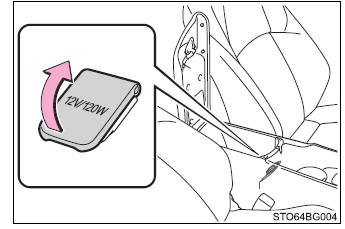
Vehicles without a smart key system: The power outlet can be used when the engine switch is in the "ACC" or "ON" position.
Vehicles with a smart key system: The power outlet can be used when the engine switch is in ACCESSORY or IGNITION ON mode.
- To avoid damaging the power outlet, close the power outlet cover when the power outlet is not in use. Foreign objects or liquids that enter the power outlet may cause a short circuit.
- To prevent battery discharge, do not use the power outlet longer than necessary when the engine is off.
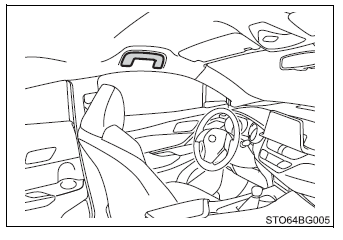
Assist grips
An assist grip installed on the ceiling can be used to support your body while sitting on the seat.

 Safety Connect.
Safety Connect is a subscription-based telematics service that uses
Global Positioning System (GPS) data and embedded cellular technology to provide
safety and security features to subscribers.
...
Other materials:
Toyota CH-R Service Manual > Steering Heater Switch: Removal
REMOVAL
PROCEDURE
1. REMOVE FRONT DOOR SCUFF PLATE LH
Click here
2. REMOVE COWL SIDE TRIM BOARD LH
Click here
3. REMOVE NO. 1 INSTRUMENT PANEL UNDER COVER SUB-ASSEMBLY
Click here
4. REMOVE INSTRUMENT CLUSTER FINISH PANEL SUB-ASSEMBLY
Click here
5. DISCONNECT HOOD LOCK CON ...
Toyota CH-R Service Manual > Back Door Courtesy Switch: Components
COMPONENTS
ILLUSTRATION
*A
w/ Package Tray Trim
*B
w/ Tonneau Cover
*1
BACK DOOR LOCK ASSEMBLY
*2
BACK DOOR LOCK COVER
*3
BACK DOOR SIDE GARNISH LH
*4
B ...
Toyota C-HR (AX20) 2023-2026 Owner's Manual
Toyota CH-R Owners Manual
- For safety and security
- Instrument cluster
- Operation of each component
- Driving
- Interior features
- Maintenance and care
- When trouble arises
- Vehicle specifications
- For owners
Toyota CH-R Service Manual
- Introduction
- Maintenance
- Audio / Video
- Cellular Communication
- Navigation / Multi Info Display
- Park Assist / Monitoring
- Brake (front)
- Brake (rear)
- Brake Control / Dynamic Control Systems
- Brake System (other)
- Parking Brake
- Axle And Differential
- Drive Shaft / Propeller Shaft
- K114 Cvt
- 3zr-fae Battery / Charging
- Networking
- Power Distribution
- Power Assist Systems
- Steering Column
- Steering Gear / Linkage
- Alignment / Handling Diagnosis
- Front Suspension
- Rear Suspension
- Tire / Wheel
- Tire Pressure Monitoring
- Door / Hatch
- Exterior Panels / Trim
- Horn
- Lighting (ext)
- Mirror (ext)
- Window / Glass
- Wiper / Washer
- Door Lock
- Heating / Air Conditioning
- Interior Panels / Trim
- Lighting (int)
- Meter / Gauge / Display
- Mirror (int)
- Power Outlets (int)
- Pre-collision
- Seat
- Seat Belt
- Supplemental Restraint Systems
- Theft Deterrent / Keyless Entry

0.0107