
Toyota CH-R Service Manual: Installation
INSTALLATION
PROCEDURE
1. INSTALL NO. 2 INSTRUMENT PANEL WIRE
|
(a) for Single Type: (1) Connect the airbag connector of the No. 2 instrument panel wire to the instrument panel passenger airbag assembly. NOTICE: When connecting any airbag connector, take care not to damage the airbag wire harness. (2) Push in the airbag connector lock to install the airbag connector to the instrument panel passenger airbag assembly. NOTICE: Securely lock the airbag connector lock. (3) Engage the clamp. |
|
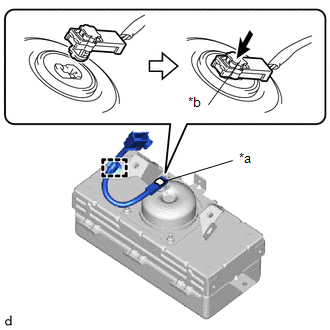
(b) for Dual Type:
|
(1) Connect the 2 airbag connectors of the No. 2 instrument panel wire to the instrument panel passenger airbag assembly. NOTICE: When connecting any airbag connector, take care not to damage the airbag wire harness. |
|
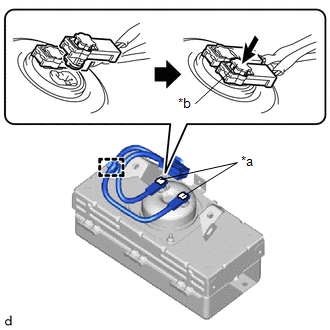
(2) Push in the 2 airbag connector locks to install the airbag connector to the instrument panel passenger airbag assembly.
NOTICE:
Securely lock the airbag connector lock.
(3) Engage the clamp.
2. INSTALL INSTRUMENT PANEL PASSENGER AIRBAG ASSEMBLY
|
(a) Push in the instrument panel passenger airbag assembly to engage the hooks to install the instrument panel passenger airbag assembly. |
|
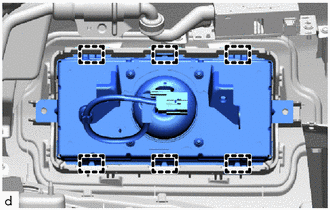
(b) Install the 2 screws.
3. INSTALL INSTRUMENT PANEL SAFETY PAD SUB-ASSEMBLY
Click here .gif)
 On-vehicle Inspection
ON-VEHICLE INSPECTION
CAUTION / NOTICE / HINT
CAUTION:
Be sure to correctly follow the removal and installation procedures for the instrument
panel passenger airbag assembly.
PROCEDURE
1. INSPE ...
 Removal
REMOVAL
CAUTION / NOTICE / HINT
The necessary procedures (adjustment, calibration, initialization, or registration)
that must be performed after parts are removed, installed, or replaced during th ...
Other materials:
Toyota CH-R Service Manual > Continuously Variable Transaxle System: How To Proceed With Troubleshooting
CAUTION / NOTICE / HINT
HINT:
The ECM of this system is connected to the CAN communication system.
Therefore, before starting troubleshooting, be sure to check that there
are no malfunctions in the CAN communication system.
*: Use the Techstream.
PROCEDURE
1. ...
Toyota CH-R Service Manual > Power Door Lock Control System: How To Proceed With Troubleshooting
CAUTION / NOTICE / HINT
HINT:
Use the following procedure to troubleshoot the power door lock control
system.
*: Use the Techstream.
PROCEDURE
1.
VEHICLE BROUGHT TO WORKSHOP
NEXT
...
Toyota C-HR (AX20) 2023-2026 Owner's Manual
Toyota CH-R Owners Manual
- For safety and security
- Instrument cluster
- Operation of each component
- Driving
- Interior features
- Maintenance and care
- When trouble arises
- Vehicle specifications
- For owners
Toyota CH-R Service Manual
- Introduction
- Maintenance
- Audio / Video
- Cellular Communication
- Navigation / Multi Info Display
- Park Assist / Monitoring
- Brake (front)
- Brake (rear)
- Brake Control / Dynamic Control Systems
- Brake System (other)
- Parking Brake
- Axle And Differential
- Drive Shaft / Propeller Shaft
- K114 Cvt
- 3zr-fae Battery / Charging
- Networking
- Power Distribution
- Power Assist Systems
- Steering Column
- Steering Gear / Linkage
- Alignment / Handling Diagnosis
- Front Suspension
- Rear Suspension
- Tire / Wheel
- Tire Pressure Monitoring
- Door / Hatch
- Exterior Panels / Trim
- Horn
- Lighting (ext)
- Mirror (ext)
- Window / Glass
- Wiper / Washer
- Door Lock
- Heating / Air Conditioning
- Interior Panels / Trim
- Lighting (int)
- Meter / Gauge / Display
- Mirror (int)
- Power Outlets (int)
- Pre-collision
- Seat
- Seat Belt
- Supplemental Restraint Systems
- Theft Deterrent / Keyless Entry

0.009