
Toyota CH-R Service Manual: Radio Broadcast cannot be Received or Poor Reception
PROCEDURE
|
1. |
CHECK RADIO RECEIVER ASSEMBLY |
(a) Check the radio automatic station search function.
(1) Check the radio automatic station search function by activating it.
|
Result |
Proceed to |
|---|---|
|
Automatic station search function does not stop |
A |
|
Automatic station search function stops on a station |
B |
| B | .gif) |
REPLACE RADIO RECEIVER ASSEMBLY |
|
.gif)
|
2. |
CHECK OPTIONAL COMPONENTS |
(a) Check if any optional components that may decrease reception capacity, such as sunshade film, are installed.
|
Result |
Proceed to |
|---|---|
|
Optional components are installed |
A |
|
Optional components are not installed |
B |
NOTICE:
Do not remove optional components without the permission of the customer.
| A | |
REMOVE OPTIONAL COMPONENTS AND CHECK AGAIN (SEE NOTICE ABOVE) |
|
|
3. |
CHECK RADIO RECEIVER ASSEMBLY |
|
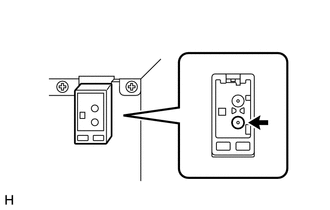
(a) Preparation for check (1) Disconnect the antenna connector from the radio receiver assembly. |
|
(b) Check for noise
(1) Turn the ignition switch to ACC with the radio receiver assembly connectors connected.
(2) Turn the radio receiver assembly on and enter AM mode.
(3) Place a screwdriver, thin wire or other metal object on the radio receiver assembly antenna jack and check that noise can be heard from the speakers.
OK:
Noise occurs.
| NG | |
REPLACE RADIO RECEIVER ASSEMBLY |
|
|
4. |
INSPECT RADIO RECEIVER ASSEMBLY |
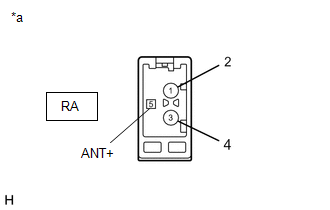
(a) Disconnect the RA radio receiver assembly connector.
|
(b) Measure the voltage according to the value(s) in the table below. Standard Voltage:
|
|
| NG | |
REPLACE RADIO RECEIVER ASSEMBLY |
|
|
5. |
REPLACE ANTENNA CORD SUB-ASSEMBLY |
(a) Replace the antenna cord sub-assembly and check if radio broadcasts can be received normally.
Click here
.gif)
OK:
Radio broadcasts can be received normally.
| OK | |
END |
|
|
6. |
REPLACE NO. 2 ANTENNA CORD SUB-ASSEMBLY |
(a) Replace the No. 2 antenna cord sub-assembly and check if radio broadcasts can be received normally.
Click here
OK:
Radio broadcasts can be received normally.
| OK | |
END |
|
|
7. |
REPLACE NO. 3 ANTENNA CORD SUB-ASSEMBLY |
(a) Replace the No. 3 antenna cord sub-assembly with a new or known good one and check if radio broadcasts can be received normally.
Click here
OK:
Radio broadcasts can be received normally.
| OK | |
END |
|
|
8. |
REPLACE ROOF ANTENNA ASSEMBLY |
(a) Replace the roof antenna assembly and check if radio broadcasts can be received normally.
Click here
OK:
Radio broadcasts can be received normally.
| OK | |
END |
| NG | |
REPLACE RADIO RECEIVER ASSEMBLY |
 CD Sound Skips
PROCEDURE
1.
CHECK CD
(a) Check that the CD is not deformed or cracked.
OK:
No deformation or cracks on the CD
...
 Panel Switches do not Function
PROCEDURE
1.
CHECK PANEL SWITCH
(a) Check for foreign matter around the switches that might prevent operation.
OK:
No foreign matter is found.
OK
...
Other materials:
Toyota CH-R Service Manual > Ambient Light: Removal
REMOVAL
PROCEDURE
1. REMOVE FRONT ARMREST BASE UPPER PANEL (for Driver Side)
Click here
2. REMOVE FRONT ARMREST BASE UPPER PANEL (for Front Passenger Side)
Click here
3. REMOVE FRONT DOOR INSIDE HANDLE BEZEL PLUG
Click here
4. REMOVE FRONT DOOR TRIM BOARD SUB-ASSEMBLY
Click here
5. ...
Toyota CH-R Service Manual > Occupant Classification Ecu: On-vehicle Inspection
ON-VEHICLE INSPECTION
CAUTION / NOTICE / HINT
CAUTION:
Be sure to correctly follow the removal and installation procedures for the occupant
detection ECU.
PROCEDURE
1. INSPECT OCCUPANT DETECTION ECU (for Vehicle not Involved in Collision)
(a) Perform a diagnostic system check.
Click here
...
Toyota C-HR (AX20) 2023-2026 Owner's Manual
Toyota CH-R Owners Manual
- For safety and security
- Instrument cluster
- Operation of each component
- Driving
- Interior features
- Maintenance and care
- When trouble arises
- Vehicle specifications
- For owners
Toyota CH-R Service Manual
- Introduction
- Maintenance
- Audio / Video
- Cellular Communication
- Navigation / Multi Info Display
- Park Assist / Monitoring
- Brake (front)
- Brake (rear)
- Brake Control / Dynamic Control Systems
- Brake System (other)
- Parking Brake
- Axle And Differential
- Drive Shaft / Propeller Shaft
- K114 Cvt
- 3zr-fae Battery / Charging
- Networking
- Power Distribution
- Power Assist Systems
- Steering Column
- Steering Gear / Linkage
- Alignment / Handling Diagnosis
- Front Suspension
- Rear Suspension
- Tire / Wheel
- Tire Pressure Monitoring
- Door / Hatch
- Exterior Panels / Trim
- Horn
- Lighting (ext)
- Mirror (ext)
- Window / Glass
- Wiper / Washer
- Door Lock
- Heating / Air Conditioning
- Interior Panels / Trim
- Lighting (int)
- Meter / Gauge / Display
- Mirror (int)
- Power Outlets (int)
- Pre-collision
- Seat
- Seat Belt
- Supplemental Restraint Systems
- Theft Deterrent / Keyless Entry

0.0089