
Toyota CH-R Service Manual: Removal
REMOVAL
CAUTION / NOTICE / HINT
The necessary procedures (adjustment, calibration, initialization, or registration) that must be performed after parts are removed and installed, or replaced during rear suspension arm assembly removal/installation are shown below.
Necessary Procedures After Parts Removed/Installed/Replaced|
Replaced Part or Performed Procedure |
Necessary Procedure |
Effect/Inoperative Function when Necessary Procedure not Performed |
Link |
|---|---|---|---|
|
Rear wheel alignment adjustment |
|
|
|
|
Removal/installation of rear height control sensor sub-assembly LH*1 |
Initialize headlight ECU sub-assembly LH |
Automatic headlight beam level control system |
|
|
Suspension, tires, etc. (The vehicle height changes because of suspension or tire replacement)*1 |
- *1: w/ Height Control Sensor
HINT:
- Use the same procedure for the RH side and LH side.
- The following procedure is for the LH side.
PROCEDURE
1. REMOVE REAR WHEEL
Click here
.gif)
2. REMOVE REAR HEIGHT CONTROL SENSOR SUB-ASSEMBLY LH (w/ Height Control Sensor)
Click here
3. REMOVE REAR STABILIZER LINK ASSEMBLY
Click here
4. REMOVE REAR COIL SPRING
Click here
5. REMOVE REAR LOWER COIL SPRING INSULATOR
Click here
6. REMOVE REAR NO. 2 SUSPENSION ARM ASSEMBLY
|
(a) Remove the nut, No. 2 camber adjust cam, rear suspension toe adjust cam sub-assembly and rear No. 2 suspension arm assembly. NOTICE: Hold the rear suspension toe adjust cam sub-assembly while rotating the nut. |
|
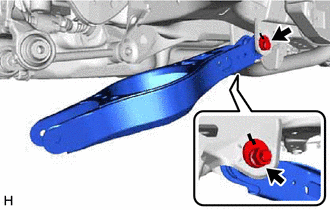
7. REMOVE REAR NO. 1 SUSPENSION ARM ASSEMBLY
|
(a) Remove the 2 bolts, 2 nuts and rear No. 1 suspension arm assembly from the rear axle carrier sub-assembly and rear suspension member sub-assembly. NOTICE: Because the nut has its own stopper, do not turn the nut. Loosen the bolt with the nut secured. |
|
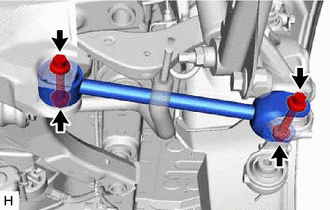
 Components
COMPONENTS
ILLUSTRATION
*1
REAR COIL SPRING
*2
REAR LOWER COIL SPRING INSULATOR
*3
REAR NO. 2 SUSPENSION ARM ASSEMBLY
...
 Installation
INSTALLATION
CAUTION / NOTICE / HINT
HINT:
Use the same procedure for the RH side and LH side.
The following procedure is for the LH side.
PROCEDURE
1. TEMPORARILY INSTALL REAR ...
Other materials:
Toyota CH-R Service Manual > Occupant Classification System: Fail-safe Chart
FAIL-SAFE CHART
FAIL-SAFE FUNCTION
(a) The following chart shows the status of the front passenger SRS items and
passenger airbag ON/OFF indicator operation under each condition.
The passenger airbag ON/OFF indicator ("ON" and "OFF") comes on for
approximately 4 s ...
Toyota CH-R Service Manual > Tire Pressure Warning System: Operation Check
OPERATION CHECK
CHECK TIRE PRESSURE WARNING SYSTEM FUNCTION
(a) Using the Data List, check that the current tire pressure is normal.
Click here
(1) Slowly reduce the tire pressure of the front or rear tires and check that
the tire pressure on the Data List changes.
(2) Further reduce the ...
Toyota C-HR (AX20) 2023-2026 Owner's Manual
Toyota CH-R Owners Manual
- For safety and security
- Instrument cluster
- Operation of each component
- Driving
- Interior features
- Maintenance and care
- When trouble arises
- Vehicle specifications
- For owners
Toyota CH-R Service Manual
- Introduction
- Maintenance
- Audio / Video
- Cellular Communication
- Navigation / Multi Info Display
- Park Assist / Monitoring
- Brake (front)
- Brake (rear)
- Brake Control / Dynamic Control Systems
- Brake System (other)
- Parking Brake
- Axle And Differential
- Drive Shaft / Propeller Shaft
- K114 Cvt
- 3zr-fae Battery / Charging
- Networking
- Power Distribution
- Power Assist Systems
- Steering Column
- Steering Gear / Linkage
- Alignment / Handling Diagnosis
- Front Suspension
- Rear Suspension
- Tire / Wheel
- Tire Pressure Monitoring
- Door / Hatch
- Exterior Panels / Trim
- Horn
- Lighting (ext)
- Mirror (ext)
- Window / Glass
- Wiper / Washer
- Door Lock
- Heating / Air Conditioning
- Interior Panels / Trim
- Lighting (int)
- Meter / Gauge / Display
- Mirror (int)
- Power Outlets (int)
- Pre-collision
- Seat
- Seat Belt
- Supplemental Restraint Systems
- Theft Deterrent / Keyless Entry

0.0082